Introduction
You are waiting in a lobby, and you’re waiting for your appointment; your eyes are wandering to a screen. Instead of a fixed poster, though, you have a live menu, a rotating schedule of events, a social media feed, or a real-time announcement that is actually useful. That is the power of modern digital signage applications.
Static signs can no longer do enough. They require manual work to refresh; they are unable to respond to dynamic information, and they rarely hold attention in spaces where individuals anticipate visual, immediate interaction. A printed notice may only show what was true yesterday. A relevant visual can show what matters right now.
This is where a modern digital signage app changes everything. It transforms ordinary screens into interactive communication devices in restaurants, hotels, offices, schools, hospitals, retail outlets, and transport centers. Nento assists companies in doing it with easy-to-use software, mobile control, and smooth CMS integration to enable quick updates and easy screen management.
In this article, we’ll explore the most useful digital signage applications, the critical features of a reliable app, and how Nento helps businesses control screens from anywhere without technical headaches.
Ready to ditch the static posters? Discover how Nento can transform your screens today.
Understanding the Core: What is a Digital Signage App?
A digital signage app is software that lets you publish dynamic content—images, videos, menus, dashboards, social media feeds, announcements, and alerts—on a screen. The hardware is the screen; the app is what makes it useful. Without software, a display is just a TV. With the right app, it becomes a managed business communication channel.
Software vs. hardware
The physical screen is called the hardware: smart TV, Android TV, commercial display, tablet, or video wall. The software determines what appears on that screen, when it appears, and who is allowed to update it.
This difference is important because many businesses that purchase screens only consider the content later. That creates frustration. Even a good screen can perform poorly when the app on the screen is difficult to use, sluggish, or lacks some critical features.
The digital signage ecosystem
An entire signage system typically consists of three components:
- The Content Management System (CMS): This is where you upload media, create layouts, set playlists, and manage screens.
- The digital signage player app: This runs on the screen or media player and displays the content.
- The controller app: This allows users to control updates, which can be on a smartphone, tablet, or browser.
The digital signage player app is particularly significant, as it is the engine that keeps content running on the display device. It manages the playback, scheduling, offline playback reliability, and communication with the CMS.
“A screen displays the message, but the app controls the experience.”
The Rise of Smartphone Control for Digital Signage
Businesses are moving away from desktop-only signage systems since real business does not always happen behind a desk. A restaurant manager may need to adjust a menu price at lunchtime. A welcome message might require a change by a hotel receptionist. A school administrator may need to issue an emergency alert.
That is why smartphone control for digital signage has become one of the most important requirements for modern screen management.
Real-time updates from anywhere
With smartphone control, users can adjust content on the fly without being near the screen. You are able to update a promotion, stop a playlist, change a menu item, or send an urgent message directly through your phone.
This is particularly handy when there are many screens or locations of the business. Teams can respond instantly instead of waiting for technical support.
No technical support needed for simple changes
An effective signage system should not require IT assistance for every minor change. Any menu price update, image change, or promotion schedule should be as easy as posting on social media.
Nento puts screen control in the user’s pocket. Its mobile-friendly interface enables quick updates, clear scheduling, and simple deployment so staff can manage content without intricate training.
Digital signage CMS for smartphone
A strong digital signage CMS for smartphones lets users manage the core functions of signage from a mobile interface. That includes uploading media, checking screen status, scheduling, and quick layout changes.
The result is reduced friction. The easier the content can be updated, the fresher the screens will be—and fresh screens perform better.
Top 5 Digital Signage Applications Across Industries
Digital signage is no longer just about ads. The best digital signage applications are those that solve real communication problems in industries.
Application 1: Retail & Hospitality
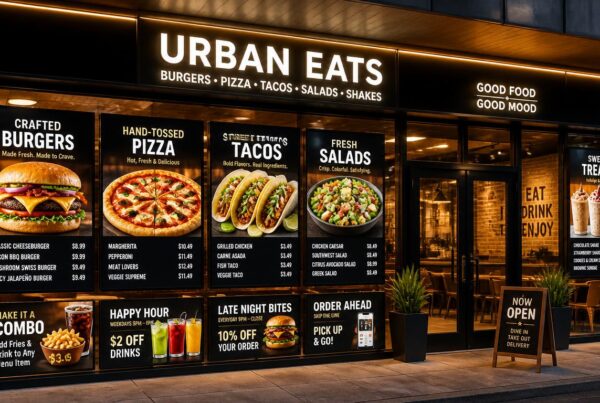
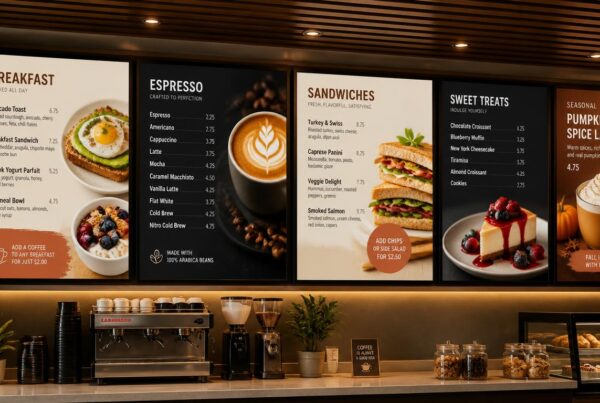
Signage helps support real-time decisions in retail and hospitality businesses. One platform can manage digital menu boards, in-store promotions, queue management, lobby messages, and event schedules.
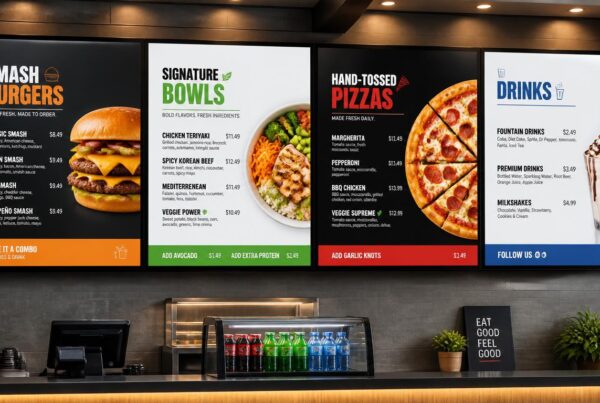
In the case of restaurants, breakfast in the morning, lunch in the afternoon, and happy hour offers in the evening can be displayed on the screens. In the case of hotels, the lobby screens can display the check-in instructions, local attractions, weather, and spa offers.
Application 2: Corporate Communications
Digital signage is used in offices for employee engagement boards, meeting room wayfinding, live KPI dashboards, and internal announcements. As opposed to using emails to send all updates, companies can post important information at the points of employee traffic.
This is especially useful in the hybrid workplaces where employees may not always sit in the same space as their teams. Screens contribute to strengthening culture, priorities, and real-time updates of operations.
Application 3: Healthcare
Digital signage is utilized in hospitals and clinics to educate patients, entertain patients in waiting rooms, support wayfinding, give instructions on appointments, and communicate with staff. In huge healthcare facilities, wayfinding alone can help relieve stress and save staff time.
Health tips and safety reminders and queue- and clinic-specific announcements can also be shown on screens. Effective communication enhances patient experience and lessens the number of repeat questions.
Application 4: Education
Digital signage is used in schools, colleges, and universities in digital bulletin boards, campus event promotion, cafeteria menus, wayfinding, and emergency alerts. A connected screen network helps administrators communicate quickly across buildings.
To students, signage makes campus life visible. For staff, it provides a quicker means of communication about announcements that ought not to be lost in email.
Application 5: Transportation
Signage supports departure and arrival boards, public announcements, wayfinding, delay notices, and advertising. Timing and clarity are critical in high-traffic settings.
Screens also assist passengers in making quick decisions as well as generating advertising revenue for operators.
“The best signage does not simply display content. It removes friction from the environment.”
Must-Have Digital Signage App Features
Not all apps are built for serious business use. The best platforms combine usability, control, reliability, and scalability. These are the digital signage app features that should be treated as essential.
User-friendly interface
A digital signage app should be user-friendly to non-technical users. If only one trained person can update the content, to update the content, your screen network becomes vulnerable. A clean interface assists the managers, front desk teams, marketers, and operators to update without fear.
Content scheduling
Scheduling enables the content to appear at particular times, dates, or dayparts. Breakfast, lunch, and dinner menus can be planned in restaurants. It is possible to make meeting reminders by office. Schools can schedule the announcements of events and emergency drills.
Remote management
Remote management allows users to manage several screens using a single dashboard. This is necessary for businesses that have multiple branches, departments, or display areas.
Interactive capabilities
Touchscreen support makes signage more interactive. Visitors can search the directories, navigate through the menu, scan QR codes, or touch the map and product details.
Template library
Templates speed up content creation. Instead of creating layouts, the user can use ready-made layouts in menus, announcements, promotions, wayfinding, and events.
Integrations
Powerful apps integrate with social media, weather, RSS feeds, calendars, and spreadsheets, among other live data sources. These integrations make screens updated automatically and reduce manual work.
Security
Access control and secure data management are essential. Businesses require the ability to control who has access to the right to publish, who can approve updates, and the protection of sensitive information.
These are the digital signage software features that separate a professional platform from a simple screen player.
The Importance of Regular Digital Signage App Updates
The regular updates of digital signage apps are not only associated with adding new buttons or templates. They improve security, enhance functionality, and keep your screens compatible with evolving devices and operating systems.
Security patches
Any connected software requires security updates. Patches can fix vulnerabilities and reduce risk, particularly when screens are linked to cloud systems or business networks.
New features and templates
New tools, layouts, and integrations also reach users through updates. This keeps content fresh and enables businesses to change with the changing communication requirements.
Performance improvements
A signage app should run smoothly. Updates have the ability to minimize buffering, improve playback stability, eliminate bugs, and clean up transitions.
Compatibility with new operating systems
Operating systems are regularly updated on smart TVs, Android TVs, and mobile platforms. A trusted signage vendor will keep the app compatible with the new OS updates.
Nento is oriented on smooth updates without interrupting live broadcasts. It implies that your screens will be able to keep up to date without unnecessary downtime.
“If your app stops updating, your signage network starts aging.”
Platform Focus: Digital Signage App for Smart TV & Android TV
The smart TVs have become a favorite hardware option due to their affordable nature, easy accessibility, and installation. A lot of businesses already have TVs, which can be turned into signage screens with the appropriate software.
Digital signage app for Smart TV
A digital signage app for smart TVs lets businesses turn existing smart displays into managed signage screens without adding complex hardware. This eliminates the requirement of additional hardware and helps businesses to start within a short period of time.
In the case of small enterprises, this can be the least expensive method of transitioning to dynamic posters to linked displays.
Digital signage app for Android TV
A digital signage app for Android TV is highly flexible since the Android-based players are inexpensive, available, and common. Android TVs work well in restaurants, retail areas, lobbies, clinics, classrooms, and offices.
This is a good method to use where teams want easy deployment and without being tied to one display brand.
Stick vs. native app vs. set-top box
Each option has its place:
- Streaming stick: Inexpensive and simple to set up, ideal in simple deployments.
- Native Smart TV app: Clean setup with fewer external devices, optimal when the TV platform is supported.
- Set-top box or professional player: Greater reliability and performance in commercial applications, multi-screen networks, or mission-critical applications.
Nento is compatible with major smart TV and Android TV environments, allowing businesses to be flexible rather than have a single direction on hardware.
Don’t get stuck with obsolete hardware. Nento supports all major Smart TV and Android TV platforms. Find out which solution fits your budget.
How to Choose the Best Digital Signage App
The best digital signage app depends on how your business will use screens every day. A platform that looks good in a demo can fail because it is hard to maintain, supports only one device type, or offers weak support.
Selection criteria
Prior to making a choice, ask the following:
Does it support smartphone control for digital signage?
Mobile control makes updates faster and more realistic for busy teams.
What is the pricing model?
One-time charges can be restrictive to updates, support, and long-term flexibility, whereas subscription pricing can be more easily scaled.
Can it scale from 1 screen to 100 screens?
A small business may begin with one screen, but the platform must be able to expand.
Is support reliable?
Screens are public-facing. When one fails, fast support matters.
Generic apps vs. industry-specific solutions
Simple content loops can be served with generic apps, but the industry-specific solutions can deal with real business workflows. Menus and dayparting are required in restaurants. Hotels require lobby messages and event schedules. Offices need meeting room details and an internal dashboard.
Nento is a strong option because it is easy to use, can be managed on a smartphone, is compatible with smart TVs, and has business-friendly screen management all in one place.
The Role of Digital Signage CMS for Smartphone
A CMS that is mobile-friendly makes the management of screens more practical for modern teams. Rather than waiting until a person comes back to a desktop, content can be updated as needs arise.
What you can do from a smartphone CMS
With the right mobile CMS, users are able to upload media, modify layouts, post announcements, set playlists, and track screen status. This is particularly useful for business owners and managers who are moving around or are on the floor.
Digital signage software features that matter on mobile
An effective mobile CMS should include cloud-based storage, analytics, AI-assisted content optimization, and screen health monitoring. These tools help users know what is playing, where it is playing, and whether screens are online.
Multi-location restaurant example
Consider a restaurant owner who is running five restaurants on a smartphone. Breakfast menus change automatically in the morning. A sold-out item can be removed from all screens in seconds. A weekend promotion can be planned once and distributed to all branches.
That is the value of mobile-first signage. The business no longer relies on printed updates, USB drives, or location-by-location edits to its business.
“The faster you can update your screens, the more useful they become.”
Conclusion
Digital signage is shifting toward mobile-first management. Businesses no longer want screens that require manual updates, USB drives, or technical support for every minor change. They desire portable, networked tools that can assist them in communicating instantly.
The future will bring an increasing amount of AI-based content, hyper-personalization, more analytics, and smarter automation. However, the foundation is already in place: improving your digital approach does not mean merely purchasing a screen. It is about choosing an appropriate application ecosystem.
Nento provides companies with the technology to easily manage content and screens from smartphones and to create digital signage that actually supports communication, interaction, and expansion.
Stop managing your screens with a laptop. Take control with your smartphone. Visit Nento now to start your free trial.
Frequently Asked Questions (FAQs)
What is a digital signage app?
A digital signage app is software that enables you to display dynamic content like videos, pictures, websites, menus, and social media on a screen. It typically consists of a player app, which runs on the screen, and a controller or CMS, which remotely controls the content.
Can I use my smartphone to control the digital signage screen?
Yes. Modern solutions such as Nento provide strong smartphone control for digital signage. You are able to manage playlists, schedule content, and change settings on your screen without the need to be physically present at the screen location, either on your Android or iOS device.
Does the digital signage app work on Android TVs and smart TVs?
Yes. Many premium signage apps can be used with Android TV and other smart TV systems, including Samsung Tizen and LG webOS. This assists companies in transforming low-cost screens into professional business displays.
What are the most important features to look for in a digital signage app?
Important digital signage app features include remote content scheduling, a cloud-based CMS, offline playback, remote support, easy templates, secure access, integrations with social media, weather, calendars, and live data feeds.
Why do I need to update my digital signage app?
Regular digital signage app updates are important in terms of security patches, bug fixes, performance improvements, and access to new features. The updates also enable the app to stay compatible with new hardware and operating systems, avoiding crashes and security threats.